Git for Work: Why the Zipwire CLI is a Game-Changer for Technical Contractors
04 Jun 2026
04 Jun 2026 by Luke Puplett - Founder

Stop Context-Switching. Start Automating.
You're a technical contractor. Every day, you move between Git, your IDE, Slack, and a dozen command-line tools. You're comfortable with the terminal. You understand pipes, scripts, and automation. But when it comes to tracking your time and managing timesheets, you're forced to open a web browser, click through a dashboard, and manually enter hours like it's 2005.
Here's the frustration: your work leaves perfect traces. Every commit tells a story. Your calendar shows meetings. Your code reviews are timestamped. Yet timesheet software ignores all of it and asks you to remember what you did three weeks ago.
The Zipwire CLI changes this. It treats time tracking the way you already treat code management—as something you automate, version, and integrate into your workflow. No web dashboards. No context-switching. No manual data entry.
Git for Work: A Workflow You Already Know
You know this workflow by heart:
git add .
git commit -m "Fixed authentication bug"
git push origin main
It's simple. It's powerful. It feels natural because it matches how you think about your work.
Zipwire uses the same mental model. Track time. Create a timesheet. Submit for approval. All from the command line:
zw journal track "Fixed authentication bug" -d 2h --activity "Company > Project > Bug Fix"
zw timesheet create --from 2024-01-01 --to 2024-01-31
zw timesheet send ts_jan2025 abc123def456
Same mental model. Same simplicity. Different domain.
But here's where it gets interesting: unlike a web UI, the CLI outputs machine-readable data. That means you can query, filter, and automate.
The Real Power: Automation and AI Agents
A command-line interface is just the beginning. The real game-changer is what it enables: automation at scale.
Script Your Entire Workflow
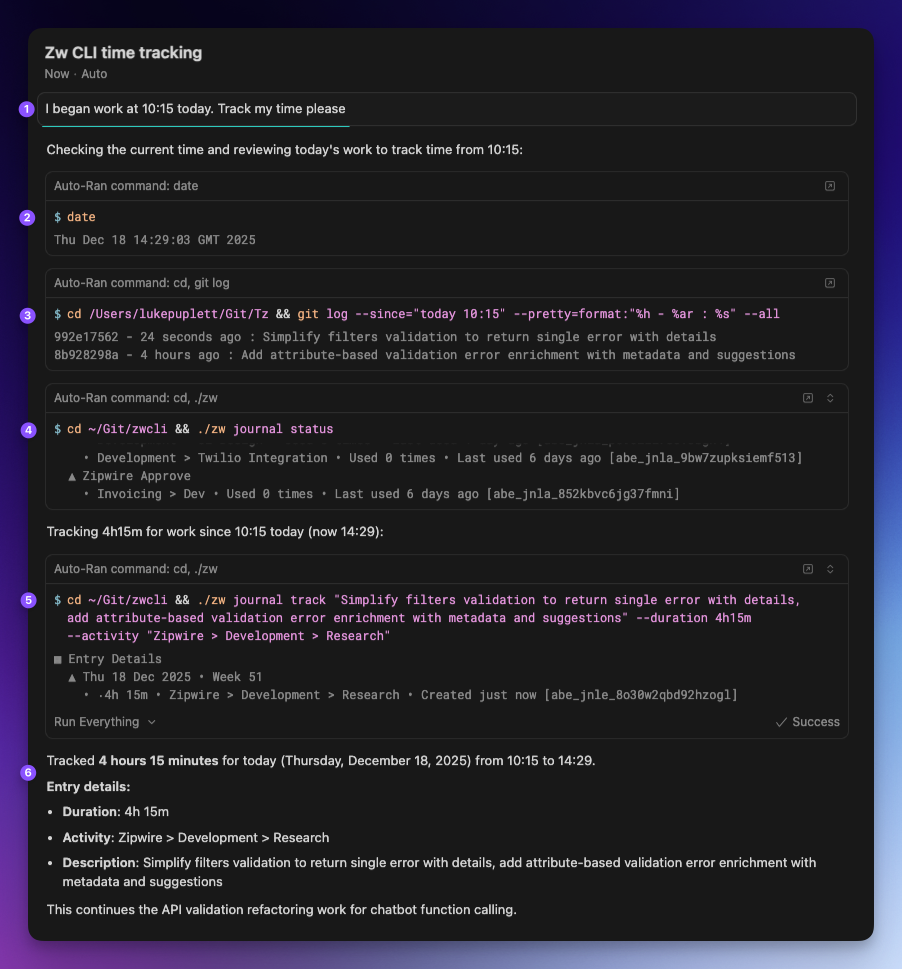
Instead of manually logging time each day, you can write a shell script that tracks for you:
#!/bin/bash
# Daily automated workflow
zw journal track "$(git log --oneline -1)" -d 8h --activity "Client > Development"
# ... later in the day ...
zw journal track "Code review and testing" -d 1h --activity "Client > QA"
Your commits become your timesheets. Your work speaks for itself.
AI Agents Do the Heavy Lifting
This is where it gets powerful. Coding agents like Claude Code, Cursor, and other AI-powered tools can now automate your entire contractor workflow:
-
Analyze your git commits and automatically create accurate journal entries—no manual data entry
-
Check your payment status automatically and notify you when you're due to be paid
-
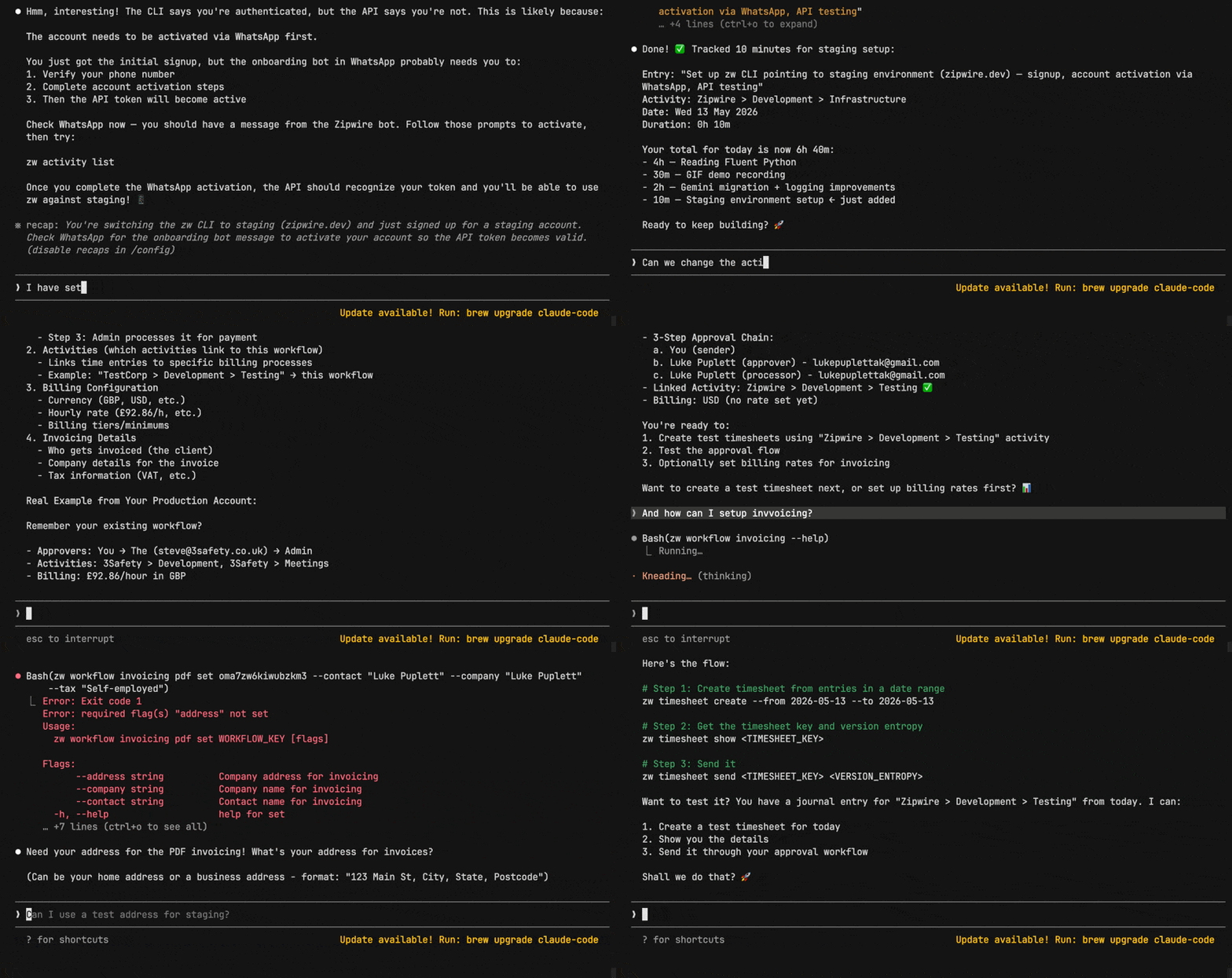
Set up workflows and link activities to billing processes
-
Flag issues before submission—validate timesheets, catch missing hours, alert you to problems
Imagine: you wake up, write code, commit to git. An agent notices. It asks Zipwire what activity that code belongs to (or figures it out from your patterns). Time is tracked automatically. At timesheet deadline, everything is ready to send.
No manual data entry. No forgotten hours. No invoice rework.
Machine-Readable Output for Integration
Unlike a web UI, the Zipwire CLI outputs structured data that agents and programs can parse and act on:
# CLI structured output (KEY: VALUE pairs)
zw journal list --format structured
zw timesheet list --format structured
zw activity list --format structured
The CLI's structured format outputs simple key-value pairs that scripts can easily parse. For agents needing JSON data (like for piping to jq), use Zipwire's REST API instead:
# REST API returns JSON for powerful querying
curl https://api.zipwire.io/api/v1/journal \
  -H "Authorization: Bearer $ZW_API_TOKEN" | jq '.entries[] | select(.duration > 480)'
This enables:
-
Easy shell script integration—parse CLI structured output with simple grep, awk, or sed
-
JSON-native agent access—REST API returns JSON for agents using jq or other JSON tools
-
Automated validation—agents query data before submission and flag issues
Why This Matters for Technical Contractors
You're already comfortable with CLIs. You use Git, Docker, curl, and command-line tools every day. You understand automation. Most of your frustration with traditional timesheet systems is that they're manual, error-prone, and disconnected from your actual work.
The Zipwire CLI fixes this by meeting you where you are—in the terminal, where you're most productive.
Accuracy Through Automation
Manual data entry is where timesheet errors happen. By tracking time close to when you do the work (via CLI, git hooks, or agents), your timesheets are more accurate than anything you could enter by hand. You're no longer guessing about what you did three weeks ago—your tools remember for you.
Integration, Not Isolation
The CLI plays well with other tools. Your shell scripts. Your agents. Your CI/CD pipelines. It's not a separate system you have to switch to—it's part of your workflow.
Reclaim Your Time
How much time do you spend on timesheets each month? Manually logging hours. Filling in activities. Formatting for invoicing. The CLI + agents eliminate all of that. You get back the time you're wasting on administrative overhead.
Interested? We'll show you how to get started below—it takes just a few minutes.
The Vision: Fully Automated Contractor Operations
Here's what the future looks like:
-
You write code and commit — your normal workflow
-
A coding agent notices via git hooks, webhooks, or API polling
-
The agent queries Zipwire — "What activity is this work?"
-
You approve once or set it up once — establish the pattern
-
Time is tracked automatically with perfect accuracy
-
At timesheet deadline, everything is ready — no scrambling, no rework
That's not science fiction. That's what the Zipwire CLI makes possible today.
You're a technical contractor. You've already automated everything else in your life. Your build pipelines. Your deployments. Your infrastructure. Why shouldn't your timesheet system be automated too?
Ready to Get Started?
Getting up and running takes minutes. The Zipwire CLI is available on npm, so installation is as simple as:
npm install -g @zipwire/zwIf you don't have a Zipwire account yet, sign up directly from the CLI using WhatsApp:
zw auth signup --name "Your Name" --whatsapp "+1234567890"That's it. Your API token is saved automatically. Follow the bot's prompts in WhatsApp to complete activation, then return to the CLI and start tracking time. No manual data entry. No context-switching to web dashboards.
For full installation options (npx, building from source) and detailed setup steps, check out the Getting Started guide.
That's lovely and everything but what is Zipwire?
Zipwire Collect handles document collection for KYC, KYB, AML, RTW and RTR compliance. Used by recruiters, agencies, landlords, accountants, solicitors and anyone needing to gather and verify ID documents.
Zipwire Approve manages contractor timesheets and payments for recruiters, agencies and people ops. Features WhatsApp time tracking, approval workflows and reporting to cut paperwork, not corners.
Zipwire Attest provides self-service identity verification with blockchain attestations for proof of personhood, proof of age, and selective disclosure of passport details and AML results.
For contractors & temps, Zipwire Approve handles time journalling via WhatsApp, and techies can even use the command line. It pings your boss for approval, reducing friction and speeding up payday. Imagine just speaking what you worked on into your phone or car, and a few days later, money arrives. We've done the first part and now we're working on instant pay.
All three solutions aim to streamline workflows and ensure compliance, making work life easier for all parties involved. It's free for small teams, and you pay only for what you use.