You'd Never Sign a Contract Over WhatsApp. Except Now You Kind Of Can.
23 Jul 2026
23 Jul 2026 by Luke Puplett - Founder

You'd never do this. Draft a contract, sign it, and send it off for the other side to countersign - without ever opening a document editor, without a PDF, without leaving the chat window. That's the pitch, and it sounds like the kind of thing that's fun to say on LinkedIn and dangerous to actually do.
Except we just did it, on purpose, to prove it works. Here's what actually happened, warts and all, and why it's less reckless than it sounds.
Why "sign the PDF" became the default in the first place
Almost every e-signature tool on the market inherited its shape from paper. You write a contract, you export it as a PDF because that's the one format guaranteed to look the same on every screen, and then a signature becomes a proxy for "I agree to this exact PDF." The file is the thing being signed. The words inside it are almost incidental - what's actually being cryptographically or legally bound is a specific arrangement of bytes that happens to render as text when you open it correctly.
That's a strange thing to optimise for if what you actually care about is whether two people agreed to the same terms. A PDF is a rendering decision, not a legal one.
Zipwire's Signable Documents already broke that link once, by building the signature's Merkle tree over the document's actual paragraphs rather than the file's raw bytes. What's changed more recently is where that content is allowed to come from. It no longer has to start life as a PDF at all. Plain text and Markdown can go straight into a Signable Document - typed, pasted, or generated by an AI mid-conversation - and get signed exactly the same way. No export step, because there was never a print-ready document to export.
It was never about the file - it was about the words
That's the opinion this post is built on: a signature should attest to content, not to a container format. If two parties agree on a paragraph, the proof of that agreement shouldn't depend on which word processor rendered it or whether someone remembered to flatten the PDF before sending it. Zipwire's proof trees are built paragraph by paragraph, so a plain-text or Markdown contract carries exactly the same cryptographic weight as a beautifully typeset PDF - because the thing being hashed and attested was the words all along, and the PDF case was just the words wrapped in an extra layer nobody needed.
Once you accept that, "sign it from WhatsApp" stops being a stunt and starts being the obvious consequence. If the words are what matters, and a chat window can hold words, a chat window can hold a contract.
What this actually looked like, mistakes included
We tested this by asking Claude, talking to Zipwire over MCP from inside a WhatsApp conversation, to draft a short fictional agreement, attach it to an existing draft request, and send it off for signature.
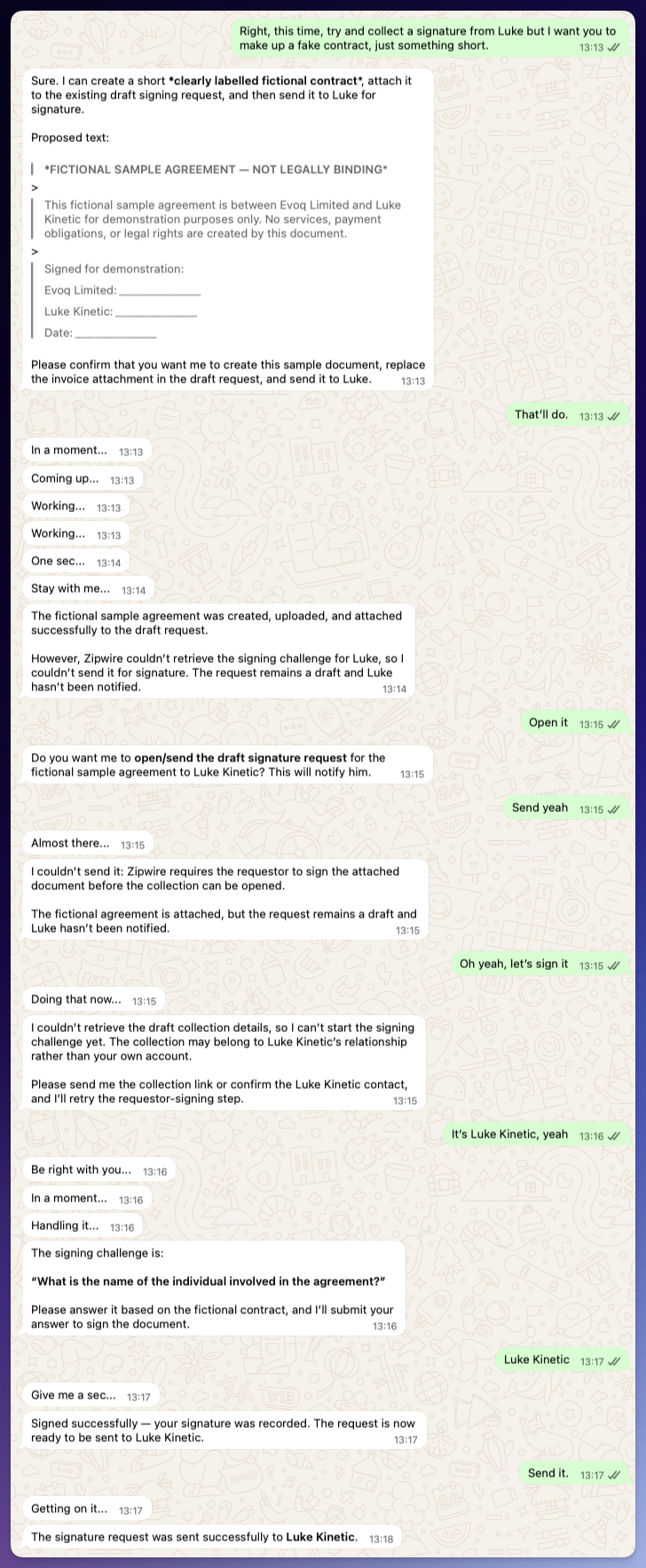
It's worth showing this one warts and all rather than a cleaned-up version. Claude drafted a clearly labelled "FICTIONAL SAMPLE AGREEMENT - NOT LEGALLY BINDING" between two named parties, attached it, and then hit real friction: it couldn't retrieve the signing challenge on the first try, then couldn't open the request because Zipwire enforces that the requestor must sign first, before a collection can even be opened and sent. That's not a bug getting in the way of the demo - that's the same rule described in the Signable Documents post, holding up under a real, slightly clumsy attempt to route around it from a chat client that had never done this before. Once Claude retried with the right context, the requestor-side signing challenge came through - "What is the name of the individual involved in the agreement?" - got answered correctly, and the request went out.
The unglamorous plumbing that had to work first
None of the above works if the chat client on the other end can't reliably send a document in, or read one back out. That sounds trivial until you try it over MCP, where a "document" has to survive being serialised into a JSON-RPC message, handed to a model, and reconstructed on the far side without silently corrupting. Collection items now also support a format=ocr-text option on download, so a respondent (or their AI) can pull back the plain extracted text of what they're about to sign, rather than needing to open a rendered file just to read it.
None of this is interesting on its own. It's the kind of work that's invisible when it works and completely blocking when it doesn't - and it's exactly why a demo like this is worth publishing rather than just describing. The screenshots above are what it looks like once that plumbing actually holds.
Countersigning from the other side, and why it's a question rather than a click
The interesting part isn't that the respondent can sign from an AI client too - it's what "signing" means when the client asking you to sign is Claude rather than a web form with a big blue "I Agree" button.
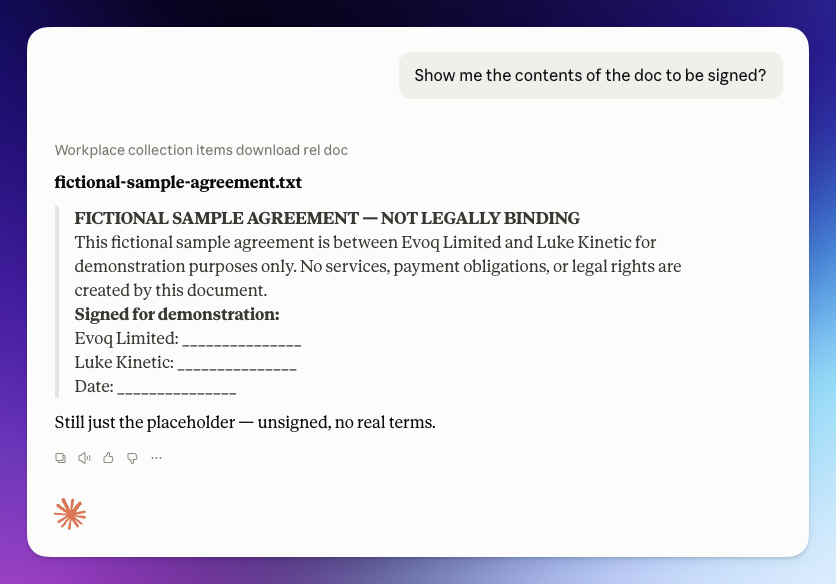
Asked to show the contents of the document before signing, Claude pulled the actual text - not a summary, not a description of what a contract like this usually contains - and stated plainly that it was "still just the placeholder, unsigned, no real terms." That distinction matters more with an AI intermediary than a human one: a chat client that's willing to summarise instead of showing the real thing is a liability the moment something is actually being signed.
Note this next screenshot is from a separate test, on a different document entirely - a car-rental itinerary, not the sample agreement above - captured to show the comprehension-question mechanism working on its own, independent of the contract example.
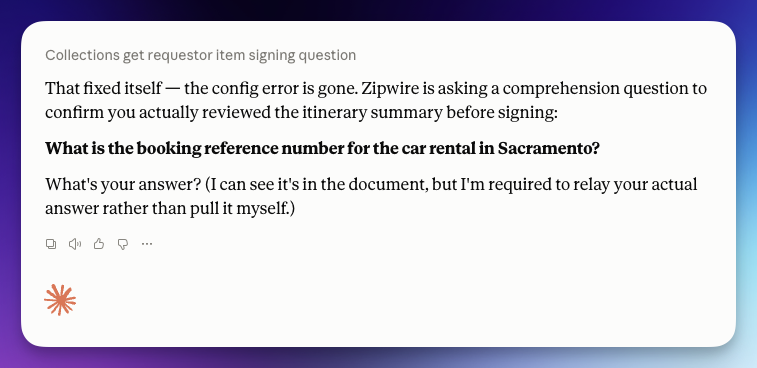
Here's the mechanism that actually does the work of proving volition. Zipwire doesn't let a signature go through on a click; it asks a comprehension question pulled from the document itself - in this example, "What is the booking reference number for the car rental in Sacramento?" Claude's own reply is the interesting bit: "What's your answer? I can see it's in the document, but I'm required to relay your actual answer rather than pull it myself." The AI is explicitly barred from answering on the human's behalf. It can read the document, draft it, even fetch the question - but it cannot supply the proof that a human actually understood what they were agreeing to. That's the whole point of asking a comprehension question instead of accepting a click: a click proves nothing about whether anyone read the thing, and an AI's own answer would prove even less.
What this buys you, and what it doesn't
The practical upside is real. A contract can be drafted, tweaked, and sent for signature entirely inside a conversation you were already having - in Claude Desktop, in WhatsApp, wherever the chat happens to be - without a round trip through a document editor or a PDF export. For a short services agreement, an NDA, a rate confirmation, that removes a surprising amount of friction: the document and the conversation about the document stop being two different places.
What it doesn't buy you is a shortcut around actually paying attention. The comprehension-question step exists precisely because chat interfaces make it easy to rubber-stamp things, and an AI that could answer on your behalf would make that worse, not better. It also doesn't buy you legal certainty about what kind of document needs this treatment - a fictional demo agreement is a fine way to prove the mechanism, but real contracts still deserve the same disclaimer we gave Signable Documents generally: strong, independently verifiable evidence of what was agreed and by whom, not a substitute for legal advice about whether a given agreement needs witnessing or notarisation in your jurisdiction.
So are we all just doing business over chat now?
Not universally, and not for everything - nobody's suggesting you sign a property lease over a voice note. But for the class of agreement that's short, low-stakes, and currently only exists as a PDF out of habit, the honest answer is: increasingly, yes. The document was always secondary to the words in it. Once the signing mechanism agrees with that, there's less reason left to insist the words live in a PDF before they can be trusted.
If you're already talking to Zipwire through Claude or WhatsApp, there's nothing extra to switch on - drafting and signing straight from the conversation is just what the connector already does. If you haven't connected it yet, the setup is in the Using Zipwire with Claude guide.
That's lovely and everything but what is Zipwire?
Zipwire Collect handles document collection for KYC, KYB, AML, RTW and RTR compliance. Used by recruiters, agencies, landlords, accountants, solicitors and anyone needing to gather and verify ID documents.
Zipwire Approve manages contractor timesheets and payments for recruiters, agencies and people ops. Features WhatsApp time tracking, approval workflows and reporting to cut paperwork, not corners.
Zipwire Attest provides self-service identity verification with blockchain attestations for proof of personhood, proof of age, and selective disclosure of passport details and AML results.
For contractors & temps, Zipwire Approve handles time journalling via WhatsApp, and techies can even use the command line. It pings your boss for approval, reducing friction and speeding up payday. Imagine just speaking what you worked on into your phone or car, and a few days later, money arrives. We've done the first part and now we're working on instant pay.
All three solutions aim to streamline workflows and ensure compliance, making work life easier for all parties involved. It's free for small teams, and you pay only for what you use.