The Headless Staffing Agency: Payday Without the Dashboard
10 Oct 2026
10 Oct 2026 by Luke Puplett - Founder

Picture the payday wrangler at a staffing agency. It might be you. It's the Monday of payroll week and you have four browser tabs, two Excel files, an Outlook inbox with 63 unread "timesheet attached" emails, and a lender's portal that logs you out every eleven minutes. Somewhere in that pile is Kate's timesheet, which forgot the bank holiday, and Kevin's approval, which he sent from a football touchline in a monsoon without opening the attachment.
Every piece of software in your life wants the same thing from you. Log in, find the screen, click the button. Now do it again a hundred times. Before Wednesday.
Here's a thought that's been rattling around the software world this year. What if the screen was optional?
Staffing admin suits that idea better than almost anything, because the people doing it are hardly ever sat at the big computer. Kate is in the car park. Kevin is up a crane. You're drowning. The work has rules, records and a workflow, and none of that really needs a dashboard to happen.
That's how we've been building Zipwire, mostly without using the word. Contractors log time over WhatsApp or from the terminal. Approvers approve with a reply. Processors can ask Claude, or any other MCP client, what's waiting and which timesheets have flags, and then act on the answer.
So this post is about what a headless staffing agency looks like on a normal Friday, what you can genuinely do with Zipwire today, and, because I'd rather you heard it from me, the bits that still need the web app.
What "headless" means, borrowed from websites
In web publishing they call it headless. A headless CMS keeps the content and the rules in the back end and lets anything ask for them: a website, an app, a voice assistant, a fridge if you really must. Online shops went the same way. This year Salesforce rebuilt itself around APIs, MCP tools and a command line and called it Headless 360, and HR vendors have started borrowing the word too.
For a staffing agency, I'd put it like this: the rules, the records and the workflow live in one place, and any front end can drive them. WhatsApp. A terminal. Claude. An agent you wrote on a wet weekend. The web app is still there, but it's one way in among several.
A word of caution, because this word is about to get stretched until it squeaks. Bolt a thin MCP wrapper onto a dashboard and you can technically call it headless, in the same way a shed with a satellite dish is technically a TV station. The test is whether real work gets done without the screen. So I'm going to be specific.
Kate never opens a timesheet
Kate's week is the same as ever. The A303 is still solid and something still goes wrong every Friday, because that's the law. The difference is that she's stopped keeping her life on Post-it notes. She sends Zipwire a WhatsApp message like "spent 2h on the rota this morning", or a voice note from the car (parked, officer), and it lands in her private journal against the right activity.
If Kate's a techie, she does it from the terminal instead:
zw journal track "Fixed the login bug" -d 45m --activity "Company > Project > Development"Coding agents are surprisingly good at this bit. Point one at your git log and it'll turn a day of commits into journal entries, which might be the most useful thing an AI has ever done for a contractor on a Friday. There's more on that in the zw CLI post.
Here's the important part. The journal is the data and the timesheet is just a view of it. When the period ends, Zipwire builds Kate's timesheet from her journal using the rules of her assignment, so it can't drift from what she actually recorded. If she worked a bank holiday, or put 13 hours on a Tuesday, it gets flagged instead of slipping quietly through. I wrote about why we split the two in Rethinking the Timesheet.
Then she sends it, from WhatsApp, from Claude or with zw timesheet send. If Kate's a freelancer who invoices the agency, her invoice is created at that same moment and pushed to Xero, FreeAgent, QuickBooks or Zoho, or produced as a PDF. She doesn't have to remember to attach it. She can't forget to attach it.
Kevin approves from the touchline
Kevin, bless him, is standing in a field in the rain watching Declan, aged 9, play football. His phone buzzes. It's Zipwire on WhatsApp, saying there's a timesheet waiting. He taps "Send me the details", reads a plain text version of Kate's week on his lickle wet scween, and replies to approve. No login, no .docx, no laptop balanced on a soggy knee.
If Kevin's on a sun lounger instead, it doesn't matter, because the timesheet went to a team inbox rather than to Kevin personally. Tracey, his deputy, picks it up and approves it, and nobody's mortgage defaults. Cheers Trace. Legend.
And if Kevin lives in Claude all day, he can review and approve from there over MCP. Same rules, same audit trail, different front end.
The agency asks instead of clicking
Now back to you, at the agency, on the snow-capped summit of Mount Payday. Instead of opening the processing screen and scrolling, you open Claude, connected to Zipwire over MCP, and ask: what's waiting for me, and which ones have flags?
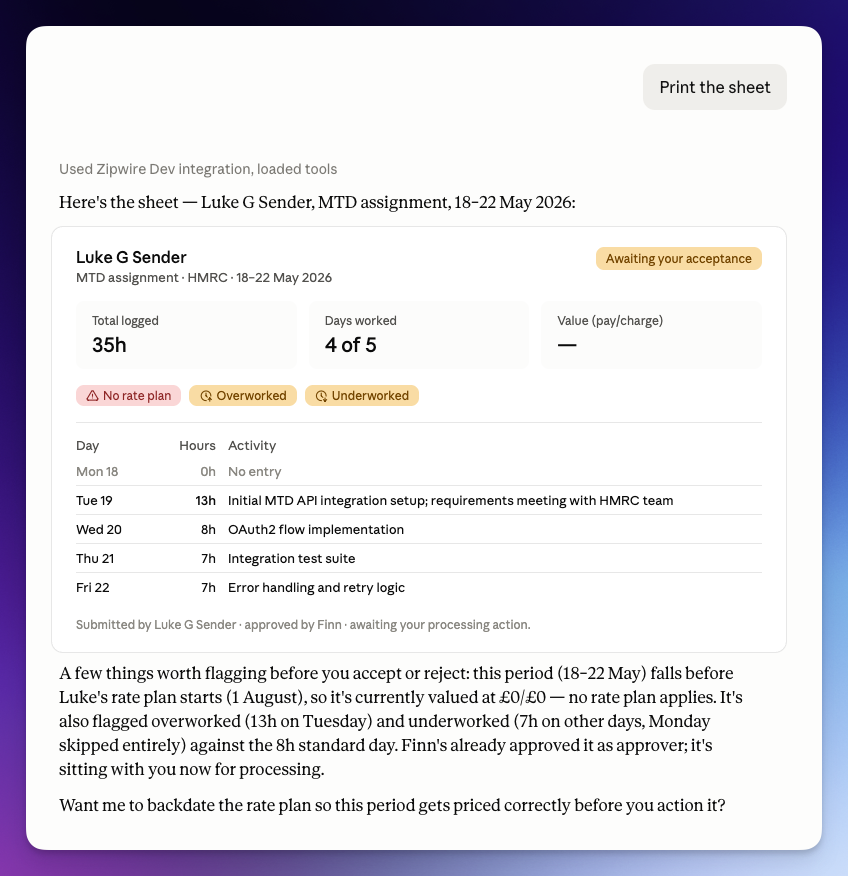
In one of our own tests, Claude fetched a timesheet for processing and, without being asked, pointed out three things. Tuesday was billed at 13 hours against an 8-hour standard day. The days either side were underworked. And the period predated the contractor's rate plan, which explained why the charge showed £0. Then it offered to fix the rate plan backdating, rather than just getting on with it. You decide. Claude does the clicking. The full story is in Two Things Claude Already Catches.
You can also ask for a summary of everything needing attention, or search a workplace for a timesheet or invoice by name or invoice number, which beats trawling Outlook for "FW: FW: RE: timesheet".
The setup can happen this way too. Over MCP, an agency admin can create a workplace, set up teams, add a client, create the assignment by making themselves the approver or processor, invite the contractors, and set rate and billing plans. Assignments can be set up over WhatsApp as well.
Compliance without the portal
Before Kate can start, the agency needs her documents, and this is usually where the chasing begins. Here's one from our own testing. A three-second voice note to Zipwire's WhatsApp assistant, "I need to get his company details", was enough for it to ask two follow-up questions, match an existing template by name, confirm, and send the request.
The next morning, Claude's own daily briefing listed the request under "Needs attention", with the sections still outstanding. Asked about it, Claude offered to fill it in, but it asked for the real company details first and said it would wait. It didn't invent a registration number to look helpful, which is more than I can say for some humans I've worked with. That one's written up in A Voice Note Started It.
Reviewing works the same way. Collection admins can read submissions and ID check results from any MCP client. On one right-to-work check, every automated check came back green, but Claude read the data from the passport, saw it didn't match the self-declared name and date of birth, and recommended rejecting it. A person still made the call. You can also send a collection from an existing template over MCP, or, in beta, ask it to draft a one-off collection from a plain-English description.
Headless, with a head where it matters
"Headless" has a slightly creepy ring to it. Agents doing the admin while nobody watches. In staffing that's a fair worry. So we've cared less about what an AI can do and more about where it has to stop.
When a document is signed in Zipwire, the signer is asked a comprehension question taken from the document itself. In our WhatsApp contract test, Claude could see the answer and still said it was required to relay the person's own answer rather than supply one. Access works the same way. An MCP client only gets in after a person approves it on Zipwire's consent screen, and the zw CLI only gets a key after a person signs in with a passkey or wallet in the browser. Agents get access because somebody granted it, not because they found the door.
And if agents are going to act for people, someone eventually asks who authorised this agent. Our answer is a chain anyone can check: a verified human holds an IsAHuman attestation, delegates to their agent's wallet with IsDelegate, and the agent presents a ProofPack carrying only the claims a service needs. Know your customer, meet know your agent.
What still needs the web app (the honest list)
Here's what you'll still open a browser for today:
Designing reusable collection templates. The assistant can draft a one-off collection from a prompt (that's in beta), but it isn't saved as a template you can reuse.
Generating client invoices from approved timesheets. That's still a button in the Prep stage of the web app.
First-time sign-in. A web sign-in to get a CLI key, and a consent screen for each MCP client. That one's on purpose.
Just as worth saying is what isn't on the list. Assignments can be set up over MCP or WhatsApp, and contractor invoices go out automatically whenever a timesheet is sent, however it's sent, including to Xero.
Two more things a developer will want to know. There's no published REST reference for Approve and Collect yet, so MCP is the documented way in for code and agents. And there are no outbound webhooks yet, so an agent that wants to react to events has to poll for now. A REST reference, client invoices over MCP and outbound webhooks are the gaps we'd most like to close next.
How to try it
Add Zipwire to Claude, or any other MCP client, as a connector at https://zipwire.io/api/v1/mcp and approve it when the consent screen appears. The Using Zipwire with Claude guide walks through it.
If you live in a terminal, install the CLI and sign in:
npm install -g @zipwire/zw
zw auth login
And if you'd rather just talk to it, WhatsApp is right there. Kevin's already on it, probably in a field. Approving by WhatsApp is covered in the docs.
Staffing admin, finally sorted.
That's lovely and everything but what is Zipwire?
Zipwire Collect handles document collection for KYC, KYB, AML, RTW and RTR compliance. Used by recruiters, agencies, landlords, accountants, solicitors and anyone needing to gather and verify ID documents.
Zipwire Approve manages contractor timesheets and payments for recruiters, agencies and people ops. Features WhatsApp time tracking, approval workflows and reporting to cut paperwork, not corners.
Zipwire Attest provides self-service identity verification with blockchain attestations for proof of personhood, proof of age, and selective disclosure of passport details and AML results.
For contractors & temps, Zipwire Approve handles time journalling via WhatsApp, and techies can even use the command line. It pings your boss for approval, reducing friction and speeding up payday. Imagine just speaking what you worked on into your phone or car, and a few days later, money arrives. We've done the first part and now we're working on instant pay.
All three solutions aim to streamline workflows and ensure compliance, making work life easier for all parties involved. It's free for small teams, and you pay only for what you use.